Getting Data from the Farmtek Polaris
Apr. 28, 2026Farmtek Polaris? #
If you don't know what the Farmtek Polaris is, their own website describes it as "a full featured, multi-event timer for timing of equestrian events including barrel racing, pole bending, roping, team penning, bull riding, cutting, show jumping and more. The Polaris timer is also used in a wide variety of non-equestrian events including lap timing, autocross, drag racing, track and field events, speed training, and dog agility trials."
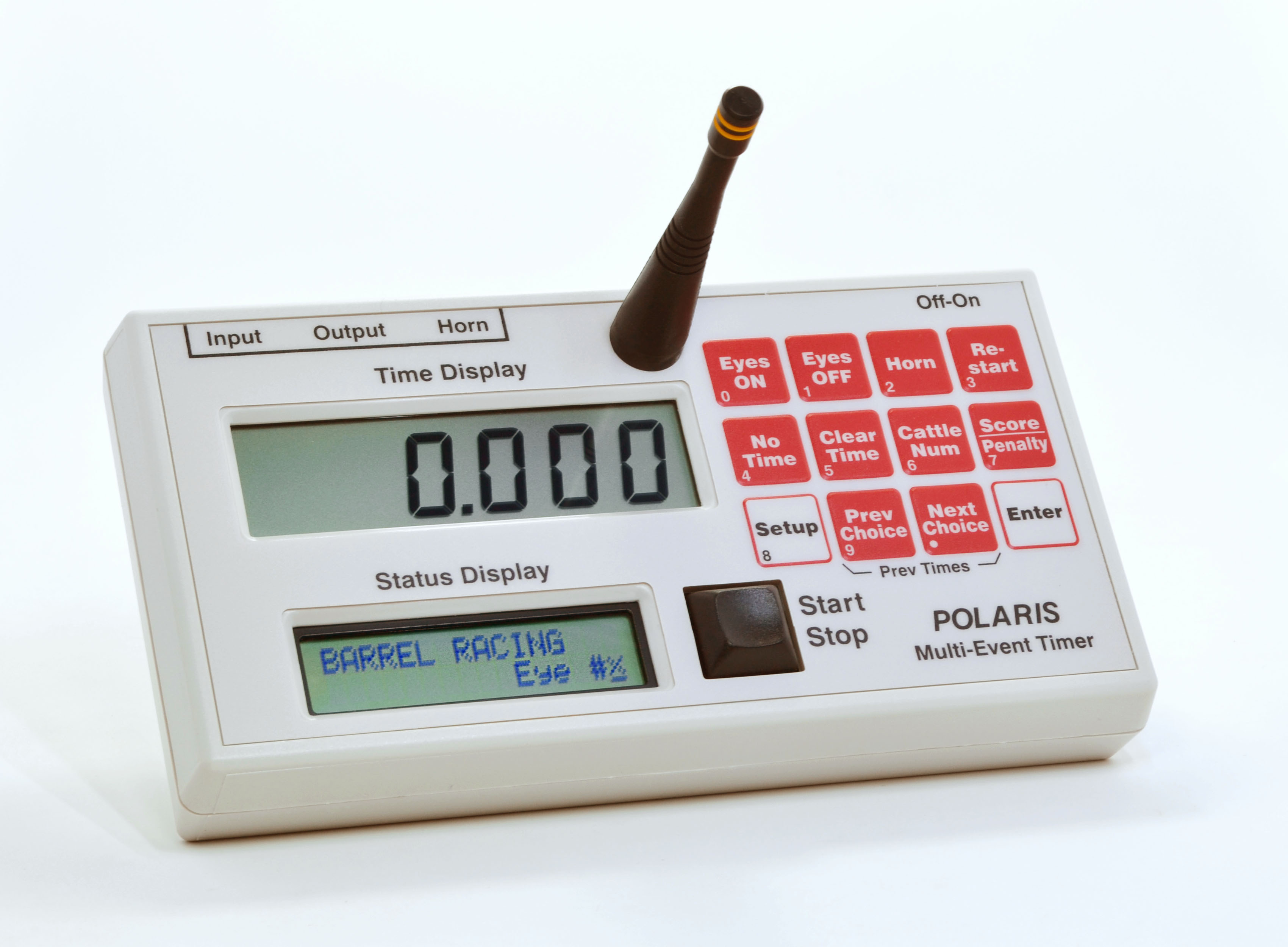 This is what the FarmTek Polaris looks like. (farmtek.net)
My personal experience with this device is as a motorsport timer so I will be documenting my experience capturing the timing data from it in that context.
Connecting to the Polaris #
Before we get data out of the Polaris, we need to figure out how to connect to the device. These devices are sometimes used to directly drive a motorsport lap printer. When someone completes a lap, these devices communicate with the printer and you will get a little slip with the time of your latest lap.
We are more interested in ingesting the times digitally than printing out times. We can look into what the Polaris sends over the "Output" port. Since the Farmtek company sells these "Computer Interface Cables", we know that the data we need is coming from here.
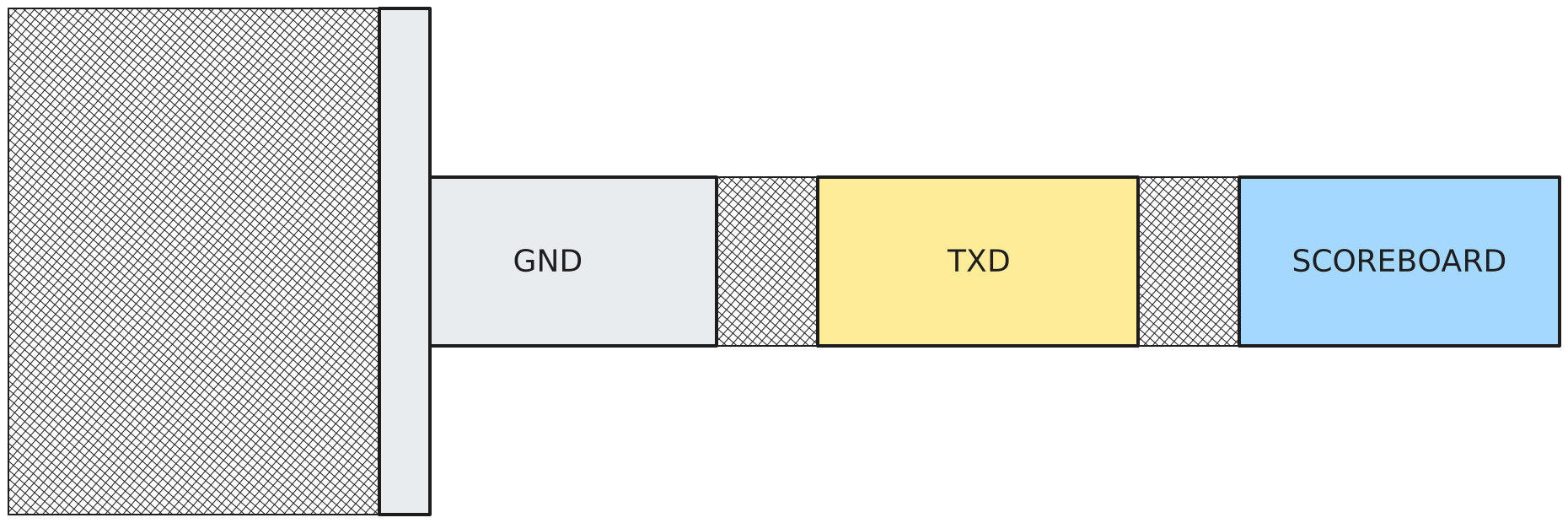 The 3.5mm Output Jack Pinout
The "Output" port on the Polaris is a 3.5mm jack with a special pinout that features a couple different things. It is a three conductor setup where the base is GND, the ring is UART TXD and the tip is some Scoreboard output. The one we are interested is the UART pin as it is how these devices communicate with the printers.
Seeing the Data #
The easiest thing to do now is to just connect our GND and UART TXD pins to an oscilloscope and see if we can capture the frames that the Polaris transmits.
If you are following along, my Polaris device is in "Autocross" mode with the interface type set to "Tag Heuer".
I will start at a baud rate of 9600 and an idle state of high to see if we get any data on start and stop triggers.
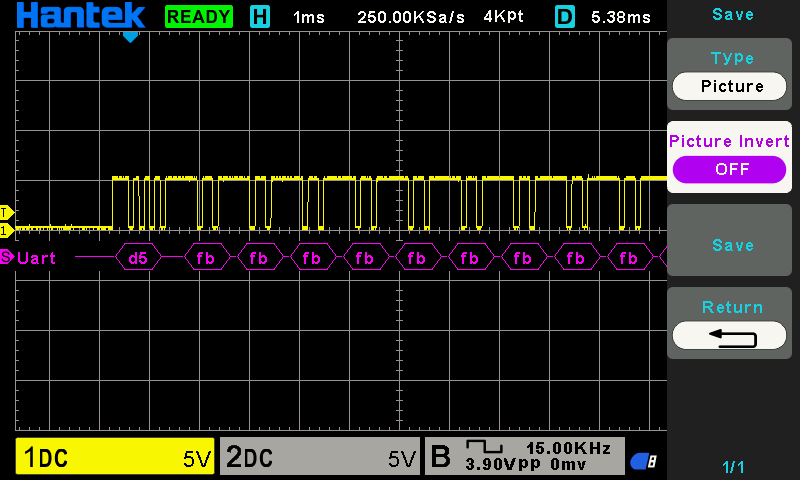
We can see that we are getting some obviously structured binary data so this baud rate might be correct. The easiest thing to try here is just to switch to an idle state of low before we start messing with baud rates.
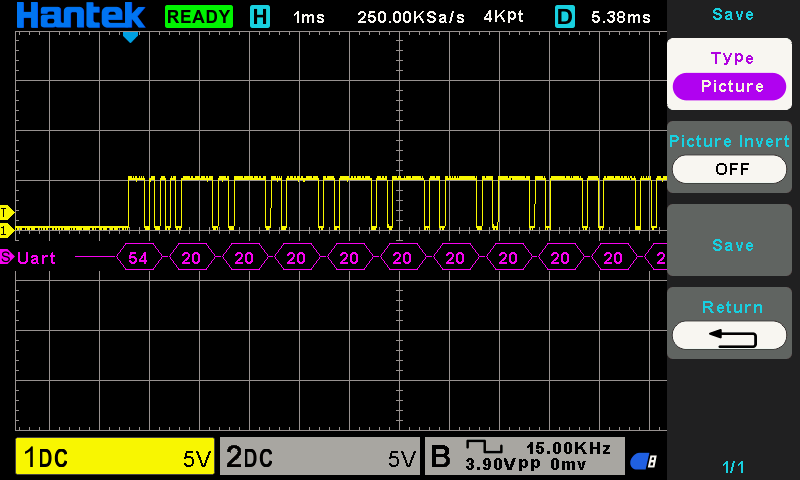
This looks good now. These seem to be ASCII characters with 54 being 'T' and 20 being ' ' (space). We can also see that the UART is using a TTL of 5V.
Ingesting the Data #
So now that we know that our data is ASCII, the baudrate is 9600, it is idle low, and that the TTL is 5V, we can begin the process of ingesting the data digitally. I personally used an FT232RL adapter that I had laying around but pretty much any UART to USB adapter should work given that it can invert RXD (or set it to idle low) and it supports 5V TTL. The FT232RL can do this if you use ft232r_prog on Linux or the official program for Windows.
Make sure the Polaris UART TXD on the 3.5mm jack is connected to the UART RXD on your adapter.
Once you have the Polaris hooked up to your UART to USB adapter and the USB adapter to your computer, you can use much any serial program to dump the data that it is outputting. I personally like picocom. Once connected and you have your serial port open, you can press the trigger a few times and get some data.
T           01 00:17:11.509000
T           02 00:18:37.216000
...Parsing a Timing Frame #
Now that we have the data reliably arriving, we just need to parse these timing frames that we get over serial. The format seems pretty simple: starts with a 'T', has a few spaces, has a status indicator and then a timestamp.
I'm going to write a simple parser in Rust but this is possible in any language and should be simple to follow.
pub struct PolarisFrame {
    /// This is the trigger value.
    trigger: u8,
    /// This is the timestamp in milliseconds.
    timestamp: u64,
}

#[derive(Default)]
pub struct PolarisParser {
    // We have this a String because we know that our data is always ASCII.
    buffer: String,
}

impl PolarisParser {
    // We feed bytes into the parser and it can return an arbitrary number of parsed frames.
    pub fn feed(&mut self, bytes: &[u8]) -> Vec<PolarisFrame> {
        self.buffer.push_str(&String::from_utf8_lossy(bytes));

        let mut frames = Vec::new();

        // We find any new line characters.
        while let Some(pos) = self.buffer.find(['\r', '\n']) {
            let total_line = &self.buffer[..=pos];
            let trimmed_line = total_line.trim();

            if !trimmed_line.is_empty()
                && let Some(frame) = Self::parse_frame(trimmed_line)
            {
                frames.push(frame);
            }

            self.buffer.drain(..=pos);
        }

        frames
    }

    // This parses a single frame of data from the Polaris.
    fn parse_frame(line: &str) -> Option<PolarisFrame> {
        let mut parts = line.split_whitespace();

        let tag = parts.next()?;
        // This ensures that we are getting a proper frame.
        // If it doesn't start with 'T' then we can assume we got garbage.
        if tag != "T" {
            return None;
        }

        let trigger_str = parts.next()?;
        let trigger: u8 = trigger_str.parse().ok()?;

        // We only support 01 or 02 as the trigger which becomes 1..=2.
        if !(1..=2).contains(&trigger) {
            return None;
        }

        let time_str = parts.next()?;

        // HH:MM:SS.mmm000
        let (hms, ms_part) = time_str.split_once('.')?;

        let mut hms_parts = hms.split(':');
        let hours: u64 = hms_parts.next()?.parse().ok()?;
        let minutes: u64 = hms_parts.next()?.parse().ok()?;
        let seconds: u64 = hms_parts.next()?.parse().ok()?;

        let millis: u64 = ms_part.get(..3)?.parse().ok()?;

        let timestamp = millis + seconds * 1000 + minutes * 60 * 1000 + hours * 60 * 60 * 1000;

        Some(PolarisFrame { trigger, timestamp })
    }
}

#[cfg(test)]
mod tests {
    use super::*;

    #[test]
    fn test_parse_start() {
        let mut parser = PolarisParser::default();
        let frames = parser.feed("T           01 00:17:11.509000\r".as_bytes());
        assert_eq!(frames.len(), 1);
        let frame = &frames[0];
        assert_eq!(frame.trigger, 1);
        assert_eq!(frame.timestamp, 17 * 60 * 1000 + 11 * 1000 + 509);
    }

    #[test]
    fn test_parse_stop() {
        let mut parser = PolarisParser::default();
        let frames = parser.feed("T           02 00:18:37.216000\r".as_bytes());
        assert_eq!(frames.len(), 1);
        let frame = &frames[0];
        assert_eq!(frame.trigger, 2);
        assert_eq!(frame.timestamp, 18 * 60 * 1000 + 37 * 1000 + 216);
    }

}Summary #
The Polaris in Autocross mode with interface type "Tag Heuer". The "Output" port uses a 3 pin 3.5mm jack port. It uses the base as ground and the ring as the UART pin. It uses 9600 baud and idle low and can be ingested using commodity UART to USB converters. It outputs a simple ASCII format that can be parsed, involving a 'T', a few spaces, trigger status, and timestamp.